From 19 to 185 tokens per second: bringing llama.cpp and vLLM to a dual R9700
How slow is “out of the box” when you’re running a 27-billion-parameter model on a brand-new, dual-GPU workstation? For the first several days I spent getting llama.cpp and vLLM running on a pair of Radeon AI PRO R9700s, the answer was a painful 19 tokens per second. This is the story of that journey, all the way up to 185.
If you want to skip the hardware and driver setup and jump straight to the performance results, click here. Commands in this post are drawn from the official AMD ROCm documentation, the llama.cpp repository, the community Radiance vLLM MXFP4 patch, and OpenCode.
The build
First, the hardware. The heart of the machine is a pair of ASRock Creator Radeon AI PRO R9700 cards, each with 32 GB of VRAM — 64 GB in total, which is just about enough to hold a 27-billion-parameter model at 8-bit precision entirely in GPU memory alongside a healthy context window. They’re paired with an AMD Ryzen 9 9950X 16-core CPU, 32 GB of G.Skill Flare X5 DDR5-6000, a Crucial T500 4 TB NVMe drive for the models, and a Corsair RM1000x 1000 W supply to keep the whole thing fed.
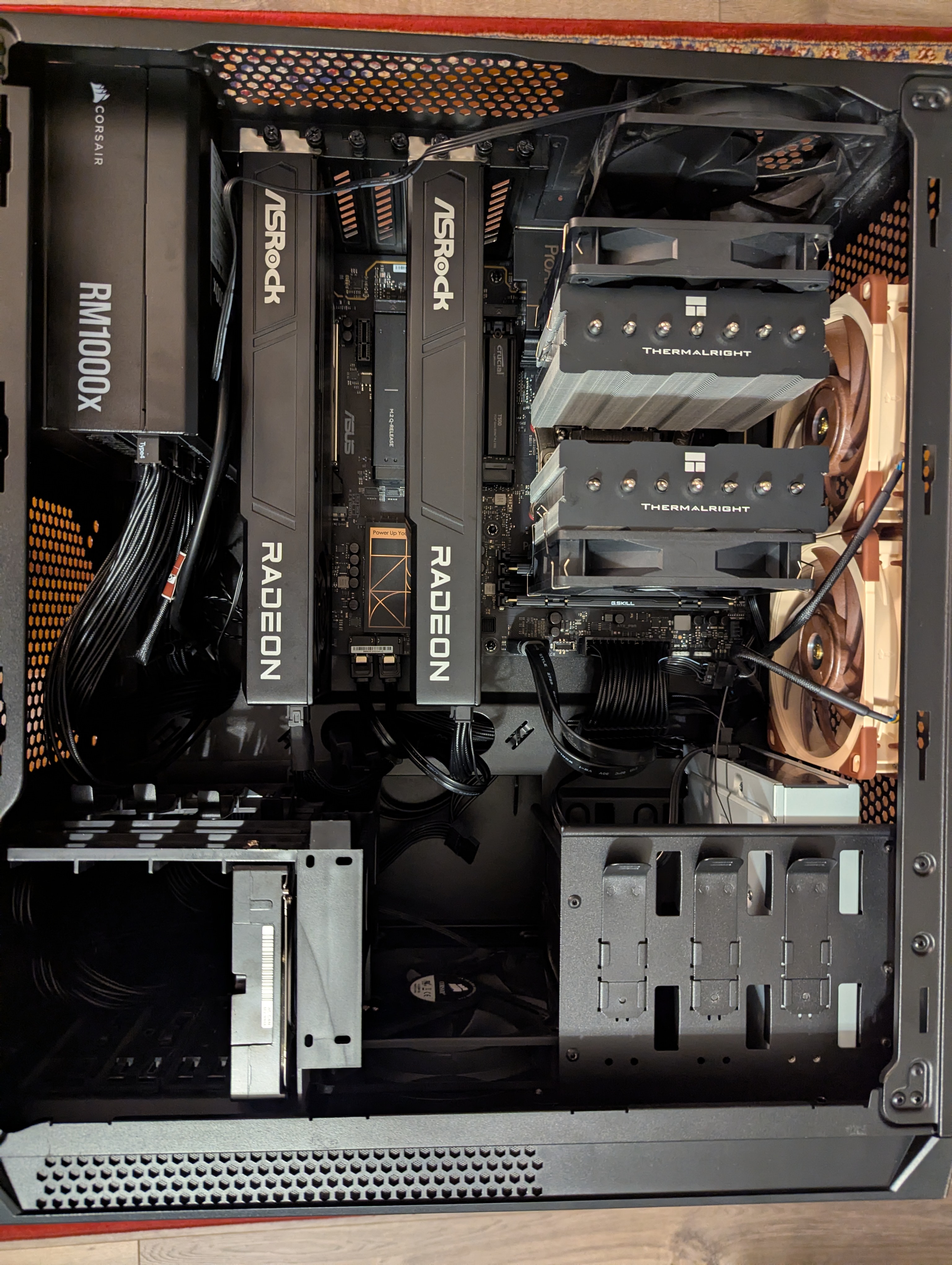
I chose Ubuntu 26.04, the latest LTS release, as the operating system.
The one decision I’d flag for anyone replicating this is the motherboard. My first candidate only had a single PCIe 5 slot; a second card would have had to talk to the rest of the system through the chipset rather than directly to the CPU, which would have throttled the peer-to-peer transfers between the two GPUs. Thankfully, Vahid — a friend from grad school who is working on his own 3x V620 AI server build — pointed me toward the Asus ProArt B850-Creator WiFi Neo, which has two PCIe 5 slots. Being a consumer board, the two slots share the CPU’s lanes and negotiate down to 8×/8×, but that is still far faster than routing the second card through the chipset would have been. (I confirmed in Linux that both cards negotiated PCIe 5.0 at 32 GT/s over 8 lanes.)
Installing the AMD drivers
With the box together, the next step was getting the AMD software stack installed. The official ROCm 10.0.0 documentation for the R9700 (which reports as gfx1201) walks through the process, and the essential commands are:
# Extra libraries some ROCm tools need
sudo apt install libatomic1 libquadmath0

# Build tools for compiling llama.cpp from source
sudo apt install -y build-essential cmake git wget

# Give the current user access to the GPU render/video devices
sudo usermod -a -G render,video $LOGNAME
After a reboot, register the ROCm repository and install the gfx1201 developer meta-package:
sudo mkdir --parents --mode=0755 /etc/apt/keyrings
wget https://stable.repo.amd.com/rocm/gpg/packages.gpg -O - | \
    gpg --dearmor | sudo tee /etc/apt/keyrings/amdrocm.gpg > /dev/null
sudo apt update
sudo apt install amdrocm-core-dev10.0-gfx1201
Then verify that both cards are visible to the system:
rocminfo
amd-smi version
Both GPUs should report as gfx1201. (For monitoring while models are running, watch -n 1 amd-smi is a nice way to see live VRAM and power draw on both cards.)
First attempt: llama.cpp
Now for the fun part. I compiled llama.cpp with ROCm support using the standard HIP build:
cd ~/git
git clone https://github.com/ggml-org/llama.cpp.git
cd llama.cpp
HIPCXX="$(hipconfig -l)/clang" HIP_PATH="$(hipconfig -R)" cmake -S . -B build -DGGML_HIP=ON -DCMAKE_BUILD_TYPE=Release
cmake --build build --config Release -j$(nproc)
Note that this is the default build — nothing here targets the R9700’s gfx1201 architecture specifically. I grabbed the Qwen 3.8 27B model at Q8_0 from Unsloth:
wget -O ~/models/Qwen3.8-27B-Q8_0.gguf https://huggingface.co/unsloth/Qwen3.8-27B-GGUF/resolve/main/Qwen3.8-27B-Q8_0.gguf
and fired up a test generation:
./build/bin/llama-cli -m ~/models/Qwen3.8-27B-Q8_0.gguf -ngl 999 -p "Write a short poem about compiling C++." -n 128
It worked — but it took forever to load, and it only managed 590 tokens per second on prompt processing and 19.2 tokens per second on generation. That felt slow compared to what others were reporting.
Oddly enough, Qwen 27B was the only model that would load at all. I additionally tried Gemma 4 and GPT OSS 120B, and llama.cpp simply hung at the model-loading phase for both.
The fix, which I only learned at the end of a long troubleshooting session, was to pass --no-mmap (now superseded by -lm none) at launch. With it, Qwen 3.8 27B loaded quickly, and the other models loaded at all. My best guess is that memory mapping is simply broken on the default drivers with ROCm and Ubuntu 26.04, so the moment you stop memory-mapping the weights and load them straight into VRAM, everything starts working.
Second attempt: optimizing llama.cpp
Even with the model loading, 19.2 tokens per second on generation was not where I wanted to be. Why was it capped there? Because the default multi-GPU mode in llama.cpp is a layer split: one GPU calculates its assigned layers while the other sits idle, so the two cards’ 640 GB/s of memory bandwidth are not pooled for autoregressive generation. On top of that, I realized I had compiled llama.cpp with its default settings, which do not specifically target the R9700’s gfx1201 architecture.
The fix was simply to rebuild llama.cpp pointed at gfx1201:
cd ~/git/llama.cpp
rm -rf build
HIPCXX="$(hipconfig -l)/clang" HIP_PATH="$(hipconfig -R)" cmake -S . -B build \
  -DGGML_HIP=ON \
  -DAMDGPU_TARGETS=gfx1201 \
  -DCMAKE_BUILD_TYPE=Release
cmake --build build --config Release -j$(nproc)
and to switch from the default layer split to a tensor split, so that both cards work concurrently:
./build/bin/llama-cli \
  -m ~/models/Qwen3.8-27B-Q8_0.gguf \
  -ngl 999 \
  -sm tensor \
  -fa on \
  -b 2048 \
  -ub 2048 \
  -c 16384 \
  -lm none \
  -p "Explain the mechanics of gravitational time dilation."
The result: prompt processing increased to 1,458 tokens per second, and generation climbed from 19.2 to 28 tokens per second — purely from a rebuild and a flag. It was progress, but it was still nowhere near the hundreds of tokens per second I’d seen reported for this hardware.
The breakthrough: vLLM + Radiance MXFP4
This is where Vahid earned a second thank-you. He pointed me toward a Reddit thread in which someone had gotten 280 tokens per second out of Qwen 3.8 27B on a dual R9700 setup. That thread linked to a patched vLLM “Radiance” build that not only was optimized for a dual R9700 topology, but also applied MXFP4 quantization and speculative decoding.
In a nutshell, MXFP4 reads four bits per weight (with shared block scales) instead of the eight bits per weight of Q8_0, which roughly halves the weight footprint and doubles memory-bandwidth efficiency. The Radiance build routes those weights through RDNA 4’s native Wave Matrix Multiply-Accumulate instructions rather than dequantizing to a generic path, and it layers speculative (multi-token) decoding on top to verify several tokens per forward pass.
There was one configuration change I had to make to get it to start. The Radiance serve script defaults to GPU_UTIL=0.98, which asked for essentially the entire 32 GB of VRAM on each card; on my machine, that ran out of memory at startup because the desktop environment was already holding a few hundred megabytes. I dropped it to 0.94 (and set KV_MEM=0 to let vLLM profile the KV cache dynamically) with a small wrapper:
#!/usr/bin/env bash
# Full-context serve for code / opencode: max VRAM + 256K context.
cd "$(dirname "$0")" || exit 1
exec env GPU_UTIL=0.94 KV_MEM=0 ./serve-mxfp4.sh "$@"
At that point, I recorded a massive 3,948 tokens per second on prompt processing and 184.9 tokens per second on generation — a roughly ten-fold speedup over the 19.2 tokens per second I had started with on raw Q8_0 in llama.cpp.
Results
For the full journey, here is where the performance landed at each stage, all measured on the same Qwen 3.8 27B model:
| Stage | Prompt (tok/s) | Generation (tok/s) |
|---|---|---|
| llama.cpp, default build (Q8_0) | 590 | 19.2 |
llama.cpp, gfx1201 + tensor split |
1,458 | 29.7 |
| vLLM + Radiance MXFP4 | 3,948 | 184.9 |
It turns out the difference between a default configuration and a tuned, purpose-built library is easily a magnitude of performance.
Putting it to work: OpenCode
With a fast local model serving an OpenAI-compatible endpoint, the natural next step was to actually use it. I installed OpenCode via npm following their instructions:
npm i -g opencode-ai@latest
I then took inspiration from this write-up on pointing OpenCode at a local model. The key was, after installing, to edit ~/.config/opencode/opencode.json to declare the vLLM server as a provider:
{
  "$schema": "https://opencode.ai/config.json",
  "provider": {
    "vllm-local": {
      "name": "vLLM",
      "npm": "@ai-sdk/openai-compatible",
      "options": {
        "baseURL": "http://127.0.0.1:8080/v1"
      },
      "models": {
        "Qwen3.8": {
          "name": "Qwen3.8"
        }
      }
    }
  }
}
And then, crucially, in the OpenCode CLI, instead of looking for the model under /connect, look for it under /model. Despite being configured as a provider, it does not show up in the /connect providers list; but the model does show up in /model, and once selected, it is correctly configured to work locally against the vLLM server.
A weekend of builds
To make sure the setup was actually useful and not just fast, I put it through its paces over the weekend. Sarah likes hippos, so when I asked her for something to build, we started with the classic test of asking a language model to draw an SVG — and it produced a purple hippo:

From there, I had it build a full single-page website for a fictitious hippo safari company called Mud & Bellow. You can see a screenshot below, and the live site is linked for anyone who wants to poke at it.

Conclusions
The takeaway is that this space is still a wild west. The difference between a default configuration and a tuned, purpose-built library can easily be a magnitude of performance — I went from 19 to 185 tokens per second on generation over the course of a few days of troubleshooting, and most of that gap was closed not by better hardware, but by better software choices: a gfx1201-targeted build, a tensor split, and finally a quantization and speculative-decoding stack that was actually built for this exact topology.
As I continue to learn, I’ll document my methods and findings here in this blog.